 If you use Google's calendar you can synch it with your iPhone's built in calendar (which I must say, is a really nice app). You don't have to use Apple's Cloud, or be restricted to iCal on your Mac.
Google has now provided instructions (spoken, even!) for synching your mobile device calendar with Google's, including iPhone. Better late than never.
Here's how:
1: Set up a Google Calendar account on the iPhone
On your iPhone go to:
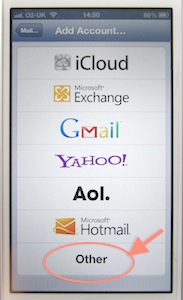
Settings> Mail, contacts, calendars > Add account > Other > Add CalDAV account
Then:
- Server is google.com,
- User name is your Google user name (the email address or whatever that you sign in with),
- Password is your Google account password,
- Description is optional.
2: In Google, select the calendars you want on your iPhone
I noticed that not all my different calendars were showing. So:- Open a mobile browser and go to this url: https://www.google.com/calendar/syncselect
- Sign into Google with your user email and password.
- On the list of your calendars, check those that you want on your iPhone.
3: Set your preferred Google calendar to be the default
Entries added on my iPhone weren't getting through initially - because it had decided to use the inbuilt Birthdays as the default calendar.- Go back to Settings > Mail, contacts, calendars > and scroll down to Calendars > Default calendar.
- You'll see a list of those available. Delete any that aren't on your Google calendar and select the one you want to be your default.
You can also delete all the extraneous additional 'calendars' (that the iPhone is born with, I suppose).
4: Select on your iPhone the calendars you want to see
- Return to the home screen and go to Calendar.
- In any view, go to Calendars (top left of the screen) and from the list select those you want it to show on your iPhone. Then you can click the Refresh button bottom left.


After about half a day searching Google for answers, my iPhone does now perfectly synch iPhone < > Google calendar < > desktop Mac, both ways throughout. Solved!
(On my MacBook / iMac I like to use Mozilla's Sunbird with the Provider add-on, but that's a different story.)
PS: Searches on Google didn't throw up the iPhone manual as a possible source of answers, but it is fairly helpful although not as detailed. I'm not sure it gives the complete answer.
PS: Searches on Google didn't throw up the iPhone manual as a possible source of answers, but it is fairly helpful although not as detailed. I'm not sure it gives the complete answer.

